- It is better to perform the actual potting of your plants somewhere other than on your balcony. It will make your downstairs neighbor much happier. Plus you don't have to haul huge bags of dirt up the stairs and through your living room.
- There isn't enough room on a balcony (or, at least, on my balcony) to plant a vegetable garden. In other words, you can't grow enough green beans in a planter box to make it worth your while. Same thing goes for carrots...
- It is best to carry full planters by the bottom when transporting them across your living room. (Ok, I didn't actually learn this the hard way, but the thought did occur to me this year as I was hauling full planters up the stairs and through the living room to the balcony. The last thing I want is the little bottom tray popping off and scattering dirt and stuff all over the carpet.)
- Just because a plant is listed as "full sun" does not mean that it is qualified for balcony life. Particularly if said balcony does not come equipped with a hose. If the instructions for the plant call for watering everyday until water runs out the bottom, just walk away. Unless you really think you'll enjoy hauling gallons of water from the kitchen to the balcony every day.
Wednesday, May 30, 2007
Lessons for Gardening on a Balcony...
This is my fourth (can you believe it?) summer in my condo, and thus my fourth try at planting things on my balcony. I'd like to believe that I've learned a few things along the way...

What more could you ask for?
Tasty food and free Over the Rhine. What could be better? Maybe a little less rain, but other than that?
Sunday I met some work friends and my sister Sarah at the Taste of Cincinnati for some food sampling and concert listening. It was pretty crowded, but we had a good time. I think that's the farthest I've been from the stage in quite a while, but there was a big video screen, so we could still see everything. The torrential downpours were a bit of a problem towards the end, but in general a good time was had by all.
Sunday I met some work friends and my sister Sarah at the Taste of Cincinnati for some food sampling and concert listening. It was pretty crowded, but we had a good time. I think that's the farthest I've been from the stage in quite a while, but there was a big video screen, so we could still see everything. The torrential downpours were a bit of a problem towards the end, but in general a good time was had by all.
Saturday, May 19, 2007
Shopping List
One of the girls at sock club this morning took some time to show off some of the purchases she'd made in Ithaca - Spinning Bunny sock yarn, in the Blueberry Patch colorway.
If anybody out there feels the need to give me an unexpected, really early birthday or Christmas gift, this would be a great idea. :)


If anybody out there feels the need to give me an unexpected, really early birthday or Christmas gift, this would be a great idea. :)


Sock Class
After reading about the Yarn Harlot's travelling socks, I thought it might be fun to try one of my own. So I signed up for sock class at Yarns & Fabrications, my local yarn store. I bought some yummy Cherry Tree Hill sock yarn and a loverly 40-inch Addi Turbo circular, and started learning how to use the Magic Loop method to make a sock.
I had some issues at first. Somehow I kept making an extra loop of yarn around the needle whenever I went to switch sides. Which was giving me an extra stitch every time. Not so fun. But we eventually got it figured out, and now I'm making good progress. See?

I had some issues at first. Somehow I kept making an extra loop of yarn around the needle whenever I went to switch sides. Which was giving me an extra stitch every time. Not so fun. But we eventually got it figured out, and now I'm making good progress. See?

I'm back!
I haven't posted here for quite a while. Life got busy. I got annoyed with my stupid MythTV computer and all its difficulties... Note: eventually those difficulties ironed themselves out and I am now running MythTV quite successfully with Ubuntu as the host. It installed with no problem. I think it had just been long enough since I bought everything that the stupid motherboard and processor were finally supported by more Linux distributions.
My intent for this blog has changed. I don't really need to keep notes on what I'm doing to my computer - because it's working! So I'm going to turn to my new hobby: knitting. :)
I'll post pictures & such of all the stuff I'm working on or have finished. It'll be fun. And I think that the name I picked for the blog (total Over the Rhine reference, by the way) fits better with a blog about the stuff that I'm knitting than it did with my MythTV notes.
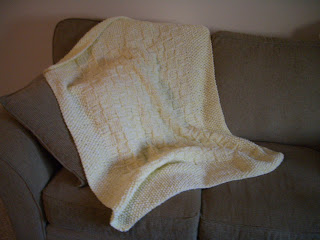
So, in honor of my first (new) post, here are some completed project photos:
- The baby blanket for Sophia. Double stranded Bernat Softee Baby. 3 skeins each of two different dye lots, since there weren't enough of one lot. I can't remember what size needles. Maybe 10.5s?

- The baby blanket for Kara's new baby whose name I can't remember. About 2/3 each of two Lion Brand Pound Of Love (huge, really huge) skeins. Size 10 needles, I think. It's tough to know for sure because towards the end I (stupid, very stupid) took the needle tips off of my Denise kit. That in itself isn't stupid, but I hadn't been removing the tips up to that point, so I didn't really remember what size of tip I was using. And once I put the tips back in the case, all I really remembered was the general case area where the needles were located. So, maybe size 10, maybe 11, maybe 10.5. Probably 10, as the gauge didn't change too much afterwards. :)


Tuesday, August 01, 2006
nVidia drivers
Reference http://www.gentoo.org/doc/en/nvidia-guide.xml
- Make sure the kernel is configured correctly for the proprietary nVidia driver
- genkernel --menuconfig all
- Confirm: Loadable module support -> [*] Enable loadable module support
- Confirm: Processor type and features -> [*] MTRR (Memory Type Range Register) support
- Update: Device Drivers -> Character devices -> <*> /dev/agpgart (AGP Support)
- Confirm: Device Drivers -> Graphics Support -> < > nVidia Framebuffer Support
- Confirm: Device Drivers -> Graphics Support -> < > nVidia Riva support
- Confirm: Device Drivers -> Graphics Support -> <*> VESA VGA graphics support
- Update: Device Drivers -> Graphics Support -> VESA driver type (vesafb-tng)
- Reboot
- Make sure the /usr/src/linux symlink is pointing to the correct sources: ls -l /usr/src/linux
- Install the drivers (nvidia-kernel & nvidia-glx). Since nvidia-glx depends on nvidia-kernel, installing nvidia-glx is sufficient: emerge nvidia-glx
NOTE: Every time you compile a new kernel or recompile the current one, you have to run "emerge nvidia-kernel" to reinstall the nvidia modules. nVidia-glx is unaffected by a kernel change and doesn't even need to be rebuilt when you recompile/upgrade X.
- Load the kernel module into memory
- modprobe nvidia
- FATAL: Error inserting nvidia (/lib/modules/2.6.16-gentoo-r13/video/nvidia.ko): Unknown symbol in module, or unknown parameter (see dmesg)
- dmesg
- nvidia: Unknown symbol remap_page_range
- nvidia: Unknown symbol pci_find_class
- Supposedly the "stable" nvidia drivers in portage are really old. It's better to use the "testing" drivers. See http://gentoo-wiki.com/HOWTO_Unmask_Nvidia_Drivers
- Unmask the driver packages
- edit /etc/portage/package.keywords
- media-video/nvidia-kernel
- media-video/nvidia-glx
- Emerge the new version and confirm: emerge -av nvidia-glx
- Unload the old kernel module: rmmod nvidia
- Load the new kernel module: modprobe nvidia
- Success! Reboot to be sure... :)
- Configure X
- edit /etc/X11/xorg.conf
- Change the Driver line in the Device section from "nv" to "nvidia"
- Change the Module section and make sure that glx gets loaded and dri does not
- Make sure that in the Screen section, the DefaultDepth directive is set to 24
- Run eselect so that X uses the nvidia glx libraries: eselect opengl set nvidia
- Add user to the video group so he has access to the nvidia device files: gpasswd -a
video - Test the card
- startx
- glxinfo | grep direct
- should say that direct rendering is activated
- test FPS: glxgears
- Enable nvidia support for apps
- edit /etc/make.conf and add "nvidia" to the USE flags
- rebuild the apps that benefit from the USE flag change: emerge -uD --newuse world
- Error: device conflicts. Ignore for now. Maybe I'll come back & rebuild apps later
- Install nvidia settings tool:
- emerge media-video/nvidia-settings
- 1 config file needs updating, so find it: find /etc -iname '._cfg*'
- /etc/modules.d/._cfg0000_nvidia
- diff /etc/modules.d/nvidia /etc/modules.d/._cfg0000_nvidia
- minor differences, so just replace the original config with the new: mv /etc/modules.d/._cfg0000_nvidia /etc/modules.d/nvidia
- Run nvidia-settings to configure graphics
- Resolution is way too small.
- edit /etc/X11/xorg.conf
- delete "1280x1024" mode from Screen/Display/Depth=24 section. New default becomes "1024x768".
- reboot. Only fixes resolution in X.
- edit /boot/grub/grub.conf, change video statement to use 1024x768
- reboot
- much better!
Sunday, July 30, 2006
MySQL
- Set up mysql (http://gentoo-wiki.com/HOWTO_MySQL)
- Set up use flags for mysql
- edit /etc/portage/package.use
- add line: dev-db/mysql innodb berkdb
- Install MySQL and its dependencies: emerge mysql
- Create the initial mysql databases
- get the mysql version: emerge -pv mysql => dev-db/mysql-4.1.20
- emerge --config =dev-db/mysql-4.1.20
- when prompted, enter a password for the root user
- Start MySQL: /etc/init.d/mysql start
- Add MySQL to load at boot: rc-update add mysql default
- Set security
- log into mysql: mysql -u root -p, enter password set above, not the linux root password
- encrypt mysql root password: set password for 'root'@'localhost'=PASSWORD('
'); - Secure the installation
- mysql_secure_installation
- don't change the root password
- remove anonymous users
- disallow root login remotely
- remove test database and access to it
- reload privilege tables
- Test databases:
- log into mysql: mysql -u root -p
- show databases
IVTV / Hauppauge
- Install ivtv:
- emerge ivtv
- CONFIG_I2C_AGOBIT: is not set when it should be.
- CONFIG_VIDEO_DEV: is not set when it should be.
- CONFIG_I2C_CHARDEV: is not set when it should be.
- CONFIG_I2C: is not set when it should be.
- Update the kernel
- genkernel --menuconfig all
- Device drivers -> generic driver options
- [ ] Prevent firmware from being built
- Unchaged:
Userspace firmawre loading support - <*> I2C support
I2C device interface - I2C algorithms ->
I2C bit banging interfaces - Multimedia devices
- <*> Video For Linux
- <*> BT848 Video For Linux
- <*> Add support for additional audio chipsets
- <*> Add support for additional video chipsets
- Try ivtv again
- reboot
- emerge ivtv
- Load the module: modprobe ivtv
- Test ivtv driver: ivtv-detect
- Try a recording test
- ivtvctl -u 0x3000
- ivtvctl -p 4
- ivtvctl -f width=720,height=480
- ivtvctl -v input=3,output=1
- cat /dev/video0 > test.mpg
- Install mplayer: emerge mplayer
- Try another recording test
- ivtv-tune
- List video inputs: ivtvctl -n
- Get the current video input: ivtvctl -P
- Set the current video input: ivtvctl -p
- Get the current frequency: ivtvctl -R
It's not working exactly the way I want, but I think I remember this happening before, and it still worked ok with mythtv. So I'm going to go on for now.
ALSA
- Figure out what drivers the sound card uses
- lspci -v | grep -i audio
- 00:1b.0 Audio device: Intel Corporation 82801G (ICH7 Family) High Definition Audio Controller (rev 01)
- Check http://www.alsa-project.org/alsa-doc/ for the module
- Manufacturer: Intel
- Driver: hda-intel
- Update kernel for alsa: genkernel --menuconfig all
- Device Drivers -> Sound
- Unchanged: <*> Sound card support
- Unchanged: < > Open Sound System
- Advanced Linux Sound Architecture
- <*> Advanced Linux Sound Architecture
Sequencer support OSS Mixer API OSS PCM (digital audio) API - PCI devices
Intel HD Audio - Wait for genkernel to recompile everything
- Install the ALSA Utilities: emerge alsa-utils
- Configure the sound card
- alsaconf
- select the hda-intel soundcard
- say yes to modify /etc/modules.d/alsa
- Add the alsa initscript to the boot runlevel: rc-update add alsasound boot
- Make sure that SAVE_ON_STOP is set to yes in /etc/conf.d/alsasound
- Add users to the audio group: gpasswd -a
audio - Test ALSA
- alsamixer
- no such device; reload /dev entries: killall udevd; udevdstart
- alsamixer
- no such device
- reboot 2x
- alsamixer
- Install links: emerge links
- Install xmms: emerge xmms
It works. It actually works! Karin sounds great in Linux... :)
X Server
- Configure /etc/make.conf. Using "nv" for VIDEO_CARDS uses the open source versions of the video drivers for my nvidia card. I'll come back and update things to use the proprietary drivers from nVidia later. Otherwise, use "nvidia" for VIDEO_CARDS.
- INPUT_DEVICES="keyboard mouse"
- VIDEO_CARDS="nv"
- Install Xorg-X11: emerge xorg-x11
- Reinitialize environment variables
- env-update
- source /etc/profile
- Configure X
- Generate an Xorg configuration file: Xorg -configure
- X was unable to detect the mouse, so edit the file it generated (/root/xorg.conf.new) and correct the device. Everything looks ok. Maybe the defaults will work.
- Test the configuration: X -config /root/xorg.conf.new
- Had problems w/ the mouse. Guess the defaults don't work.
- Monitor info from dell (http://support.dell.com/support/edocs/monitors/e770s/en/spec.htm)
- horizontal frequency range: 31.5 - 68.7 kHz
- vertical frequency range: 70.1 - 84.9 Hz
- horizontal scan range: 30 - 70 kHz (automatic)
- vertical scan range: 50 - 160 Hz (automatic)
- Try xorgconfig, which prompts for system information: xorgconfig
- Autodetect mouse
- Don't Emulate3Buttons
- Use /dev/input/mouse0
- keyboard: Generic 104-key PC
- U.S. English
- [enter] for default us variant
- don't select additional XKB options
- horizontal sync range: 7
- vertical sync range: 3
- monitor identifier: Dell e770s
- look at the video card database
- video card definition: 18 (NVIDIA (generic)
- video card memory (128MB): 10 (131072K)
- video card identifier: Geforce 6200 LE
- accept predefined modes: 4
- use 24 bit color depth by default: 5
- write file to /etc/X11/xorg.conf
- Test: X -config /etc/X11/xorg.conf
- Get rid of /root/xorg.conf.new: rm /root/xorg.conf.new
- Start an x session: startx
- Defaults to twm ("an ugly, loathsome, repulsive, deformed window manager"). Exit with Ctrl-Alt-Backspace
Thursday, July 27, 2006
Continuing...
- Get the ethernet card working again
- ifconfig eth0 up
- dhcpcd
- ping -c 3 www.google.com
- Framebuffer
- vesafb-tng is default for the gentoo kernel sources
- vesafb-tng does not need a vga statement
- important video control options
- ywrap: assume the graphical card can wrap around its memory; this may be the cause of some funny text problems I've had, so I'll leave this option off for now.
- redraw: safer scrolling default. Let's go with this one
- nomtrr: do not use memory type range registers
- mode:1280x1024-32@85 produces a resolution of 1280x1024, 32 bit color depth, and a refresh rate of 85 Hz
- video=vesafb:redraw,nomtrr,1280x1024-32@85
- Install GRUB
- emerge sync
- emerge grub
- Configure GRUB: create /boot/grub/grub.conf
# Which listing to boot as default. 0 is the first, 1 the second etc.
default 0
# How many seconds to wait before the default listing is booted
timeout 15
title=Gentoo Linux 2.6.16-r13
root (hd0,0)
kernel /boot/kernel-genkernel-x86-2.6.16-gentoo-r13 root=/dev/ram0 init=/linuxrc ramdisk=8192 real_root=/dev/sda3 udev video=vesafb:redraw,nomtrr,1280x1024-32@85
initrd /boot/initramfs-genkernel-x86-2.6.16-gentoo-r13
- Install GRUB in the MBR
- grep -v rootfs /proc/mounts > /etc/mtab
- grub-install /dev/sda
- Reboot the system
- exit
- cd
- umount /mnt/gentoo/boot
- umount /mnt/gentoo/dev failed - busy
- umount /mnt/gentoo/proc failed - not found
- umount /mnt/gentoo/var
- umount /mnt/gentoo/video
- umount /mnt/gentoo failed - busy
- list running processes: ps aux
- kill dhcpcd: kill [PID]
- umount /mnt/gentoo/dev
- umount /mnt/gentoo
- reboot
- Remove the CD!!!
Sunday, July 23, 2006
And some more... Genkernel!
- Install the kernel source: USE="-doc symlink" emerge gentoo-sources
- USE="-doc" allows avoiding xorg-x11 or other dependencies
- USE="symlink" is not necessary for a new install, but ensures proper creation of the /usr/src/linux symlink
- Check the symlink and take note of where it points (linux-2.6.16-gentoo-r13): ls -l /usr/src/linux
- Emerge the genkernel ebuild: emerge genkernel
- Copy over the kernel configuration used by the installation cd to the location where genkernel looks for the default configuration: zcat /proc/config.gz > /usr/share/genkernel/x86/kernel-config-2.6
- Compile kernel sources, using menuconfig: genkernel --menuconfig all
- The menuconfig option causes an interactive, menu-based kernel configuration utility to be invoked before building the kernel
- The all option causes the initrd, kernel image, and modules to be built
- Disable & Enable configuration options in menuconfig
- Bus options ->PCCARD (PCMCIA/CardBus) support -> < > PCCard (PCMCIA/CardBus) support
- Networking -> < > Bluetooth subsystem support
- Multi-device support (RAID and LVM) -> [ ] Multiple devices driver support (RAID and LVM)
- IEEE 1394 (FireWire) support -> [ ] IEEE 1394 (FireWire) support
- Network device support -> Wireless LAN (non-hamradio) -> [ ] Wireless LAN drivers (non-hamradio) & Wireless Extensions
- Network device support -> Token Ring devices -> [ ] Token Ring driver support
- File systems -> < > Reiserfs support
- File systems -> < > JFS filesystem support
- File systems -> < > XFS filesystem support
- Exit & save new kernel configuration
- Save the names of the kernel & initrd that werer created: ls /boot/kernel* /boot/initramfs*
- /boot/initramfs-genkernel-x86-2.6.16-gentoo-r13
- /boot/kernel-genkernel-x86-2.6.16-gentoo-r13
- Emerge & enable coldplug to detect non-boot-necessary hardware
- emerge coldplug
- rc-update add coldplug boot
- Configure the modules that should be autoloaded
- View all available modules: find /lib/modules/
/ -type f -iname '*.o' -or -iname '*.ko' - Edit /etc/modules.autoload.d/kernel-2.6 and add the names of any modules that should be loaded
- Not sure what to put here, so I didn't add anything for now.
- Create fstab
- Edit /etc/fstab
- Update to include the following settings
- /boot: /dev/sda1 /boot ext3 defaults,noatime 1 2
- swap: /dev/sda2 none swap sw 0 0
- /: /dev/sda3 / ext3 noatime 0 1
- /var: /dev/sda5 /var ext3 noatime 0 0
- /video: /dev/sda6 /video ext3 noatime 0 0
- /proc: proc /proc proc defaults 0 0
- tmpfs: shm /dev/shm tmpfs nodev,nosuid,noexec 0 0
- cdrom: /dev/cdroms/cdrom0 /mnt/cdrom auto noauto,user 0 0
- floppy: /dev/fd0 /mnt/floppy auto noauto 0 0
- Set the hostname
- Edit /etc/conf.d/hostname
- HOSTNAME="hostname"
- Set the domainname
- Edit /etc/conf.d/domainname
- DNSDOMAIN="homenetwork"
- Configure networking to use dhcp
- Edit /etc/conf.d/net
- config_eth0=( "dhcp" )
- dhcp_eth0="nodns nontp nonis"
- Configure networking to start at boot: rc-update add net.eth0 default
- Configure hostname resolution for local network:
- Edit /etc/hosts
- 127.0.0.1 localhost hostname
- Set the root password: passwd
- Update system configuration
- Edit /etc/rc.conf
- DISPLAYMANAGER="kdm"
- EDITOR="/bin/nano"
- Configure keyboard
- Edit /etc/conf.d/keymaps
- KEYMAP="us"
- SET_WINDOWKEYS="yes"
- //!!! come back here as a possible cause of weird buffer problems //!!!
- Configure clock
- Edit /etc/conf.d/clock
- Set CLOCK="UTC" because system clock is set to UTC
- Install system logger
- emerge syslog-ng
- rc-update add syslog-ng default
- Install cron
- emerge vixie-cron
- rc-update add vixie-cron default
- Install logrotate: emerge logrotate
- Configure logrotate: Edit /etc/logrotate.conf
# see "man logrotate" for details
# rotate log files weekly
weekly
# keep 4 weeks worth of backlogs
rotate 4
# create new (empty) log files after rotating old ones
create
# uncomment this if you want your log files compressed
#compress
# RPM packages drop log rotation information into this directory
include /etc/logrotate.d
notifempty
nomail
noolddir
# no packages own lastlog or wtmp -- we'll rotate them here
/var/log/wtmp {
monthly
create 0664 root utmp
rotate 1
}
/var/log/lastlog {
monthly
rotate 1
}
# system-specific logs may be configured here - Install file indexing: emerge sys-apps/slocate
- Install DHCP client: emerge dhcpcd
So here goes...
Time for another try.
Here are some docs I've been referencing:
Here are some docs I've been referencing:
- Gentoo Linux Handbook (http://www.gentoo.org/doc/en/handbook/handbook-x86.xml)
- Insert 2006.0 Gentoo Minimal Install CD and power on.
- Type gentoo at the prompt and hit [enter]
Things don't work correctly if I skip typing gentoo, even if gentoo is supposed to be the default kernel. No "gentoo", no networking.
- Hit [enter] or stop paying attention long enough to accept the default keymap.
- Hit [F2] to switch to verbose mode & make sure that it's detecting the onboard neworking.
- Make sure networking was configured correctly: ifconfig eth0
- Test networking some more: ping -c 3 www.google.com
- Figure out a partitioning scheme
- /dev/sda1: ext3, 32M, /boot
- /dev/sda2: swap, 1024M, swap
- /dev/sda3: ext3, 10240M, /
- /dev/sda4: extended
- /dev/sda5: ext3, 2048M, /var
- /dev/sda6: ext3, remainder, /video
- Partition the hard drive
- Start fdisk: fdisk /dev/sda
- Display current partition configuration: p
- Remove all current partitions: d,
- Verify all partitions are deleted: p
- Create /boot partition
- create new partition: n
- primary partition: p
- select first partition: 1
- accept default first cylinder: [enter]
- size: +32M
- Make boot partition bootable
- toggle a bootable flag: a
- select the partition to toggle: 1
- Verify boot partition: p
- Create swap partition
- create new partition: n
- primary partition: p
- select second partition: 2
- accept default first cylinder: [enter]
- size: +1024M
- Set the swap partition's type
- change partition type: t
- select second partition: 2
- select linux swap type: 82
- Verify the swap partition: p
- Create / partition
- create new partition: n
- select primary partition: p
- select third partition: 3
- accept default first cylinder: [enter]
- size: +10240M
- Create extended partition
- create new partition: n
- selected extended partition: e
- selects partition 4 by default
- accept default first cylinder: [enter]
- accept default last cylinder: [enter]
- Create /var partion
- create new partition: n
- accept default first cylinder: [enter]
- size: +2048M
- Create /video partition
- create new partition: n
- accept default first cylinder: [enter]
- accept default last cylinder: [enter]
- Save the filesystem layout: w
- Create the filesystems
- Make /boot ext3: mke2fs -j /dev/sda1
- Make / ext3: mke2fs -j /dev/sda3
- Make swap swap
- mkswap /dev/sda2
- swapon /dev/sda2
- Make /var ext3: mke2fs -j /dev/sda5
- Make /video ext3: mke2fs -j /dev/sda6
- Mount the partitions
- Mount / partition: mount /dev/sda3 /mnt/gentoo
- Make mount directories for all the other partitions
- mkdir /mnt/gentoo/boot
- mkdir /mnt/gentoo/var
- mkdir /mnt/gentoo/video
- Mount /boot partition: mount /dev/sda1 /mnt/gentoo/boot
- Mount /var partition: mount /dev/sda5 /mnt/gentoo/var
- mount /video partition: mount /dev/sda6 /mnt/gentoo/video
- Verify filesystems & mounts: df -h
- Set system time
- See www.timeanddate.com/worldclock to get UTC local time
- date [month,2][day,2][hour, UTC,2][minute,2][year,4]
- Get the stage tarball
- Change to the gentoo mountpoint: cd /mnt/gentoo
- Use links to open mirror listing for tarballs: links http://www.gentoo.org/main/en/mirrors.xml
- Select mirror from list
- Browse to /releases/x86/2006.0/stages/
- Select a stage3 tarball (stage3-x86-2006.0.tar.bz) and press d to download
- select the digests file and press d to download
- Verify the integrity of the tarball: md5sum -c stage3-x86-2006.0.tar.bz2.DIGESTS
- Unpack the tarball: tar xvjpf stage3-x86-2006.0.tar.bz2
- Install a Portage snapshot:
- Change directory: cd /mnt/gentoo
- Open mirror listing: links http://www.gentoo.org/main/en/mirrors.xml
- Select mirror from list
- Browse to /snapshots
- Download the latest portage snapshot and md5sum (portage-20060722.tar.bz2, portage-20060722.tar.bz2.md5sum)
- Verify the integrity of the snapshot: md5sum -c portage-20060722.tar.bz2.md5sum
- Extract the snapshot (case is important here): tar xvjf /mnt/gentoo/portage-
.tar.bz2 -C /mnt/gentoo/usr - Configure compile options
- Edit /mnt/gentoo/etc/make.conf
- CFLAGS="-O2 -mtune=i686 -pipe"
- CXXFLAGS="${CFLAGS}"
- MAKEOPTS="-j2"
- Select mirrors
- mirrorselect -i -o >> /mnt/gentoo/etc/make.conf
- select one or more mirrors by pressing [space] and press [enter]
- Set the SYNC setting
- mirrorselect -i -r -o >> /mnt/gentoo/etc/make.conf
- select a mirror by pressing [space] and press [enter]
- Copy the DNS info into the new environment: cp -L /etc/resolv.conf /mnt/gentoo/etc/resolv.conf
- Mount the /proc fileystem to allow the install to use the kernel-provided information within the chrooted environment: mount -t proc none /mnt/gentoo/proc
- Mount-bind the /dev filesystem: mount -o bind /dev /mnt/gentoo/dev
- Chroot into the new environment
- Change the root from / on the cd to /mnt/gentoo: chroot /mnt/gentoo /bin/bash
- Create a new environment (create new environment variables): env-update
- Load the environment variables into memory: source /etc/profile
- export PS1="(chroot) $PS1"
- Update the portage tree to the latest version
- emerge --sync
- If a new version is available, update portage: emerge portage
- If config files need to be updated: find /etc -iname '._cfg*'
- For help on updating config files: emerge --help --config
- Merge the file differences if necessary, or just move the new files over the old ones
- Verify the system profile
- ls -FGg /etc/make.profile
- Profile points to ../usr/portage/profiles/default-linux/x86/no-nptl, which isn't the preferred default
- Check if the preferred default exists: ls -d /usr/portage/profiles/default-linux/x86/2006.0
- Link to the preferred profile: ln -snf /usr/portage/profiles/default-linux/x86/2006.0 /etc/make.profile
- Verify the profile was updated: ls -FGg /etc/make.profile
- Set USE Flags
- emerge ufed
- back up /etc/make.conf: cp /etc/make.conf /etc/make.conf.good
- run ufed & make selections: ufed
- Ufed edits /etc/make.conf. My resulting flags are as follows: "audiofile bittorrent c++ cdr dvd dvdr dvdread emacs ethereal ftp gimp lirc mozilla mule mysql pdf php"
- Activate the userlocales flag
- mkdir -p /etc/portage
- echo "sys-libs/glibc userlocales" >> /etc/portage/package.use
- Specify the locales that should be supported
- edit /etc/locales.build
- comment out everything except for en_US/ISO-8859-1 and en_us.UTF-8/UTF-8
- Specify the timezone
- less /usr/share/zoneinfo
- less /usr/share/zoneinfo/US
- choose /usr/share/zoneinfo/US/Eastern: cp /usr/share/zoneinfo/US/Eastern /etc/localtime
Things I've learned so far...
- Not very many distributions like my combination of hardware. Some of them don't have the right networking drivers. Some of them kernel panic if you don't type meaningless characters at the first install prompt. So far, only Gentoo has had much success, and I haven't even had complete success there.
- My processor didn't much like my motherboard at first, either. Or maybe the other way around. I couldn't even get to POST until I updated the BIOS chip on the motherboard.
My Hardware
- CPU: Intel Pentium 4 506 Prescott 533MHz FSB 1MB L2 Cache LGA 775 EM64T
- Motherboard: ASUS P5LD2 Socket T (LGA 775) Intel 945P ATX Intel Motherboard
- Power Supply: SeaSonic S12-430 ATX12V 430W Power Supply
- Memory: CORSAIR XMS2 1GB (2 x 512MB) 240-Pin DDR2 SDRAM Unbuffered DDR2 675 (PC2 5400)
- Case: Antec Solution SLK3000-B Black Steel ATX Mid Tower
- DVD: LG 16x DVD+-R DVD Burner (GSA-4167B)
- Floppy: SONY Black 1.44MB 3.5" Internal Floppy Drive Model MPF920 Black
- Video Card: eVGA 128-TC-2N27-SX Geforce 6200 LE TC Supporting 512MB (On board 128MB) 64-bit DDR PCI Express x16 Video Card
- Hard Drive: Seagate 300GB Serial ATA
A few notes.
- I tried using a borrowed, older video card. It didn't work so well with the motherboard.
- The heatsink was quite difficult to attach to the motherboard. Stupid little black twisty thingies.
- The case is pretty big for what I have in there, but since this is my first time building a machine from parts, it's nice to have the extra space. Plus, it leaves me plenty of room for adding additional drives, if I ever get Myth working well enough to need that.
- The case came with a broken clip on the front. Antec was really good about sending a replacement. In fact, they sent me two.
What's with the name?
Over the Rhine did a Christmas tour by that name a few years back. I have the poster. I like the poster. And I like snow. Plus, Faith once gave me a birthday card that was an edited version of the poster with different variations on "Jen's birthday" replacing every tour date. I think that's enough, really.
So, I'm starting this blog mostly to have a place to record my struggles with MythTV, Gentoo, and my stupid motherboard. I'm sure I'll add some other things down the line. Or maybe not.
So, I'm starting this blog mostly to have a place to record my struggles with MythTV, Gentoo, and my stupid motherboard. I'm sure I'll add some other things down the line. Or maybe not.
Subscribe to:
Posts (Atom)
